Fluorescence-lifetime imaging (FLIM)
This section describes the FLIM related measurements classes of the Time Tagger API.
FlimAbstract
-
class FlimAbstract : public IteratorBase
This is an interface class for FLIM measurements that defines common methods.
Public Functions
-
bool isAcquiring()
Tells if the class is still acquiring data. It can only reach the false state if
stop_after_outputframe > 0.This method is different from
isRunning()and indicates if the specified number of frames is acquired. After acquisition completed, it can’t be started again.- Returns:
True/False.
-
bool isAcquiring()
Flim
Changed in version 2.7.2.
Note
The Flim (beta) implementation is not final yet. It has a very advanced functionality, but details are subject to change. Please give us feedback (support@swabianinstruments.com) when you encounter issues or when you have ideas for additional functionality.
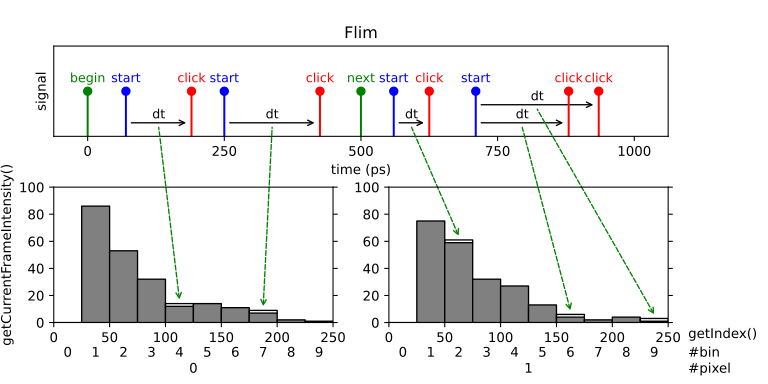
Fluorescence-lifetime imaging microscopy (FLIM) is an imaging technique for producing an image based on the differences in the exponential decay rate of the fluorescence from a sample.
Fluorescence lifetimes can be determined in the time domain by using a pulsed source. When a population of fluorophores is excited by an ultrashort or delta-peak pulse of light, the time-resolved fluorescence will decay exponentially.
This measurement implements a line scan in a FLIM image that consists of a sequence of pixels. This could either represent a single line of the image, or - if the image is represented as a single meandering line - this could represent the entire image.
We provide two different classes that support FLIM measurements: Flim and FlimBase. Flim provides a versatile high-level API. FlimBase instead provides the essential functionality with no overhead to perform Flim measurements. FlimBase is based on a callback approach.
Please visit the Python example folder for a reference implementation.
Note
Up to version 2.7.0, the Flim implementation was very limited and has been fully rewritten in version 2.7.2. You can use the following 1 to 1 replacement to get the old Flim behavior:
# FLIM before version 2.7.0:
Flim(tagger, click_channel=1, start_channel=2, next_channel=3,
    binwidth=100, n_bins=1000, n_pixels=320*240)

# FLIM 2.7.0 replacement using TimeDifferences
TimeDifferences(tagger, click_channel=1, start_channel=2,
    next_channel=3, sync_channel=CHANNEL_UNUSED,
    binwidth=100, n_bins=1000, n_histograms=320*240)
-
class Flim : public FlimAbstract
High-Level class for implementing FLIM measurements. The Flim class includes buffering of images and several analysis methods.
This class supports expansion of functionality with custom FLIM frame processing by overriding virtual/abstract
frameReady()callback. If you need custom implementation with minimal overhead and highest performance, consider overridingFlimBaseclass instead.The data query methods are organized into a few groups.
The methods
getCurrentFrame...()relate to the active frame which is currently being acquired.The methods
getReadyFrame...()relate to the last completely acquired frame.The methods
getSummedFrames...()operate to all frames which have been acquired so far. Optional parameter only_ready_frames selects if the current incomplete frame shall be included or excluded from calculation.The methods
get...Exinstead of an array return aFlimFrameInfoobject containing frame data with additional information collected at the same time instance.Warning
When overriding this class, you must set
pre_initialize=Falseand then callinitialize()at the end of your custom constructor code. Otherwise, you may experience unstable or erratic behavior of your program, as the callbackframeReady()may be called before construction of the subclass completed.Public Functions
-
Flim(TimeTaggerBase tagger, channel_t start_channel, channel_t click_channel, channel_t pixel_begin_channel, int n_pixels, int n_bins, timestamp_t binwidth, channel_t pixel_end_channel = CHANNEL_UNUSED, channel_t frame_begin_channel = CHANNEL_UNUSED, int finish_after_outputframe = 0, int n_frame_average = 1, bool pre_initialize = true)
- Parameters:
tagger – Time tagger object instance.
start_channel – Channel on which start clicks are received for the time differences histogramming.
click_channel – Channel on which clicks are received for the time differences histogramming.
pixel_begin_channel – Start marker of a pixel (histogram).
n_pixels – Number of pixels (histograms) of one frame.
n_bins – Number of histogram bins for each pixel.
binwidth – Bin size in picoseconds.
pixel_end_channel – End marker of a pixel - incoming clicks on the click_channel will be ignored afterwards (optional, default: CHANNEL_UNUSED).
frame_begin_channel – Start the frame, or reset the pixel index (optional, default: CHANNEL_UNUSED).
finish_after_outputframe – Sets the number of frames stored within the measurement class. After reaching the number, the measurement will stop. If the number is 0, one frame is stored and the measurement runs continuously (optional, default: 0).
n_frame_average – Average multiple input frames into one output frame (default: 1).
pre_initialize – Initializes the measurement on constructing (optional, default: True). On subclassing, you must set this parameter to False, and then call
initialize()at the end of your custom constructor method.
-
int[,] getCurrentFrame()
- Returns:
The histograms for all pixels of the currently active frame, 2D array with dimensions [n_bins, n_pixels].
-
FlimFrameInfo getCurrentFrameEx()
- Returns:
The currently active frame data with additional information collected at the same instance of time.
-
float[] getCurrentFrameIntensity()
- Returns:
The intensities of all pixels of the currently active frame. The pixel intensity is defined by the number of counts acquired within the pixel divided by the respective integration time.
-
int getFramesAcquired()
- Returns:
The number of frames that have been completed so far, since the creation or last clear of the object.
-
timestamp_t[] getIndex()
- Returns:
A vector of size n_bins containing the time bins in ps.
-
int[,] getReadyFrame(int index = -1)
- Parameters:
index – Index of the frame to be obtained. If -1, the last frame which has been completed is returned. (optional, default: -1).
- Returns:
The histograms for all pixels according to the frame index given. If index is -1, it will return the last frame, which has been completed. When stop_after_outputframe is 0, the index value must be -1. If
index >= stop_after_outputframe, it will throw an error. 2D array with dimensions [n_bins, n_pixels]
-
FlimFrameInfo getReadyFrameEx(int index = -1)
- Parameters:
index – Index of the frame to be obtained. If -1, the last frame which has been completed is returned. (optional, default: -1).
- Returns:
The frame according to the index given. If index is -1, it will return the latest completed frame. When stop_after_outputframe is 0, index must be -1. If
index >= stop_after_outputframe, it will throw an error.
-
float[] getReadyFrameIntensity(int index = -1)
- Parameters:
index – Index of the frame to be obtained. If -1, the last frame which has been completed is returned. (optional, default: -1).
- Returns:
The intensities according to the frame index given. If index is -1, it will return the intensity of the last frame, which has been completed. When stop_after_outputframe is 0, the index value must be -1. If
index >= stop_after_outputframe, it will throw an error. The pixel intensity is defined by the number of counts acquired within the pixel divided by the respective integration time.
-
int[,] getSummedFrames(bool only_ready_frames = true, bool clear_summed = false)
- Parameters:
only_ready_frames – If true, only the finished frames are added. On false, the currently active frame is aggregated. (optional, default: True).
clear_summed – If True, the summed frames memory will be cleared. (optional, default: False).
- Returns:
The histograms for all pixels. The counts within the histograms are integrated since the start or the last clear of the measurement.
-
FlimFrameInfo getSummedFramesEx(bool only_ready_frames = true, bool clear_summed = false)
- Parameters:
only_ready_frames – If true, only the finished frames are added. On false, the currently active frame is aggregated. (optional, default: True).
clear_summed – If True, the summed frames memory will be cleared. (optional, default: False).
- Returns:
A sum of all acquired frames with additional information collected at the same instance of time.
-
float[] getSummedFramesIntensity(bool only_ready_frames = true, bool clear_summed = false)
- Parameters:
only_ready_frames – If true, only the finished frames are added. On false, the currently active frame is aggregated. (optional, default: True).
clear_summed – If True, the summed frames memory will be cleared. (optional, default: False).
- Returns:
The intensities of all pixels summed over all acquired frames. The pixel intensity is the number of counts within the pixel divided by the integration time.
Protected Functions
-
virtual void frameReady(int frame_number, int[] data, timestamp_t[] pixel_begin_times, timestamp_t[] pixel_end_times, timestamp_t frame_begin_time, timestamp_t frame_end_time)
The method is called automatically by the Time Tagger engine for each completely acquired frame. In its parameters, it provides FLIM frame data and related information. You have to override this method with your own implementation.
Warning
The code of override must be fast, as it is executed in context of Time Tagger processing thread and blocks the processing pipeline. Slow override code may lead to the buffer overflows.
- Parameters:
frame_number – Current frame number.
data – 1D array containing the raw histogram data, with the data of pixel
iand time binjat indexi * n_bins + j.pixel_begin_times – Start time for each pixel.
pixel_end_times – End time for each pixel.
frame_begin_time – Start time of the frame.
frame_end_time – End time of the frame.
-
Flim(TimeTaggerBase tagger, channel_t start_channel, channel_t click_channel, channel_t pixel_begin_channel, int n_pixels, int n_bins, timestamp_t binwidth, channel_t pixel_end_channel = CHANNEL_UNUSED, channel_t frame_begin_channel = CHANNEL_UNUSED, int finish_after_outputframe = 0, int n_frame_average = 1, bool pre_initialize = true)
FlimFrameInfo
-
class FlimFrameInfo
This is a simple class that contains FLIM frame data and provides convenience accessor methods.
Note
Objects of this class are returned by the methods of the |FLIM| classes. Normally user will not construct
FlimFrameInfoobjects themselves.Public Functions
-
int getFrameNumber()
- Returns:
The frame number, starting from 0 for the very first frame acquired. If the index is -1, it is an invalid frame which is returned on error.
-
bool isValid()
- Returns:
A boolean which tells if this frame is valid or not. Invalid frames are possible on errors, such as requesting the last completed frame when no frame has been completed so far.
-
int getPixelPosition()
- Returns:
A value which tells how many pixels were processed for this frame.
-
int[,] getHistograms()
- Returns:
All histograms of the frame, 2D array with dimensions [n_bins, n_pixels].
-
float[] getIntensities()
- Returns:
The summed counts of each histogram divided by the integration time.
-
int[] getSummedCounts()
The summed counts of each histogram.
-
timestamp_t[] getPixelBegins()
An array of the start timestamps of each pixel.
-
timestamp_t[] getPixelEnds()
An array of the end timestamps of each pixel.
-
int getFrameNumber()
FlimBase
The FlimBase provides only the most essential functionality for FLIM tasks. The benefit from the reduced functionality is that it is very memory and CPU efficient. The class provides the FlimBase.frameReady callback, which must be used to analyze the data.
-
class FlimBase : public FlimAbstract
This is a minimal class that acquires a FLIM frame and calls virtual/abstract
frameReady()callback method with the frame data as parameters. This class is intended for custom implementations of fast FLIM frame processing with minimal overhead. You can reach frame acquisition rates suitable for realtime video observation.If you need custom FLIM frame processing implementation while retaining functionality present in the
Flimclass, consider subclassingFliminstead.Warning
When overriding this class, you must set
pre_initialize=Falseand then callinitialize()at the end of your custom constructor code. Otherwise, you may experience unstable or erratic behavior of your program, as the callbackframeReady()may be called before construction of the subclass completed.Public Functions
-
FlimBase(TimeTaggerBase tagger, channel_t start_channel, channel_t click_channel, channel_t pixel_begin_channel, int n_pixels, int n_bins, timestamp_t binwidth, channel_t pixel_end_channel = CHANNEL_UNUSED, channel_t frame_begin_channel = CHANNEL_UNUSED, int finish_after_outputframe = 0, int n_frame_average = 1, bool pre_initialize = true)
- Parameters:
tagger – Time tagger object instance.
start_channel – Channel on which start clicks are received for the time differences histogramming.
click_channel – Channel on which clicks are received for the time differences histogramming.
pixel_begin_channel – Start marker of a pixel (histogram).
n_pixels – Number of pixels (histograms) of one frame.
n_bins – Number of histogram bins for each pixel.
binwidth – Bin size in picoseconds.
pixel_end_channel – End marker of a pixel - incoming clicks on the click_channel will be ignored afterwards (optional, default: CHANNEL_UNUSED).
frame_begin_channel – Start the frame, or reset the pixel index (optional, default: CHANNEL_UNUSED).
finish_after_outputframe – Sets the number of frames stored within the measurement class. After reaching the number, the measurement will stop. If the number is 0, one frame is stored and the measurement runs continuously (optional, default: 0).
n_frame_average – Average multiple input frames into one output frame (default: 1).
pre_initialize – Initializes the measurement on constructing (optional, default: True). On subclassing, you must set this parameter to False, and then call
initialize()at the end of your custom constructor method.
Protected Functions
-
virtual void frameReady(int frame_number, int[] data, timestamp_t[] pixel_begin_times, timestamp_t[] pixel_end_times, timestamp_t frame_begin_time, timestamp_t frame_end_time)
The method is called automatically by the Time Tagger engine for each completely acquired frame. In its parameters, it provides FLIM frame data and related information. You have to override this method with your own implementation.
Warning
The code of override must be fast, as it is executed in context of Time Tagger processing thread and blocks the processing pipeline. Slow override code may lead to the buffer overflows.
- Parameters:
frame_number – Current frame number.
data – 1D array containing the raw histogram data, with the data of pixel
iand time binjat indexi * n_bins + j.pixel_begin_times – Start time for each pixel.
pixel_end_times – End time for each pixel.
frame_begin_time – Start time of the frame.
frame_end_time – End time of the frame.
-
FlimBase(TimeTaggerBase tagger, channel_t start_channel, channel_t click_channel, channel_t pixel_begin_channel, int n_pixels, int n_bins, timestamp_t binwidth, channel_t pixel_end_channel = CHANNEL_UNUSED, channel_t frame_begin_channel = CHANNEL_UNUSED, int finish_after_outputframe = 0, int n_frame_average = 1, bool pre_initialize = true)