在 NI LabVIEW 中快速上手 Time Tagger
了解如何通过 .NET 节点在 NI LabVIEW 中编程控制 Time Tagger,包括示例位置和操作演示视频。
Time Tagger 软件引擎采用高度优化的 C++ 编写,并通过语言封装支持 Python、MATLAB、C#/.NET 等其他编程语言;各语言版本具备相同功能和函数签名。因此,在不同支持语言中编程控制 Time Tagger 的方式高度一致,也可共用此处提供的文档。
在 LabVIEW 中,可通过我们的 .NET 程序集对 Time Tagger 进行编程控制。所有函数均与编程接口文档中的说明一致。要开始使用,请查看 Time Tagger 安装目录中的 LabVIEW 示例。
C:\Program Files\Swabian Instruments\Time Tagger\examples\LabView
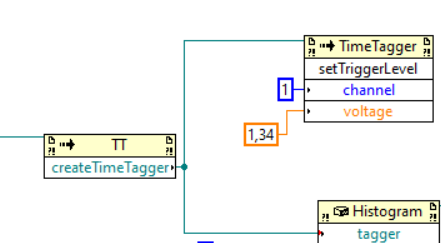
Time Tagger 库不以原生 LabVIEW VI 的形式提供;所有函数及其参数均在 LabVIEW 中表示为 .NET 节点。外观虽略有不同,但工作方式相近,可通过连线连接输入与输出端。开始编程时,请创建 .NET 类构造函数,并选择已在系统范围注册的程序集“SwabianInstruments.TimeTagger”。
有关在 LabVIEW 中使用 .NET 的更多信息,请参阅此链接。
您可以调用 Time Tagger 对象的相应方法,设置触发电平、输入延迟等参数。
点击此处观看视频教程,了解如何在 LabVIEW 中开始编程控制 Time Tagger。